Short answer: Search Google for site:yourdomain.com. If nothing comes back, Google hasn't indexed the site, usually because something blocks it, such as a leftover noindex setting or a robots.txt rule, or because the site is new and nothing links to it yet. If your pages do come back, the site is indexed but ranks too low for the searches you tried, which is a question of pages, competition and trust. Google Search Console tells you which case you're in, and why.
You type the name of your business into Google and scroll. Then you type what you sell and the name of your town, and scroll some more. Your competitor is there and you aren't. It's a horrible feeling, and the usual reaction is to assume Google has something against you.
It almost never does. "Not showing up" is really one of two different problems, and the fix depends on which one you have. Sorting that out takes about five minutes.
Want to know where your own site stands? The $49 website and SEO audit checks indexing, crawler access and the pages search tools quote, and you get a written report within 3 working days. Or start with the free website check.
Is the site missing from Google, or just ranking low?
Open Google and search for site: followed by your domain, with no space, for example site:yourcompany.com. Google then lists only pages from that domain.
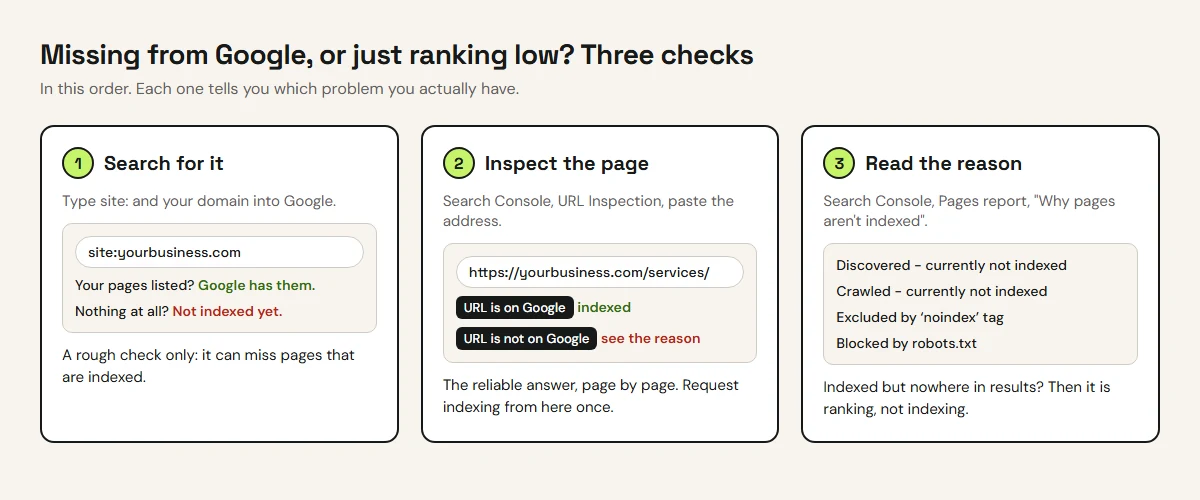
- No results at all. Google has no pages from your site in its index. The rest of the work is finding out what stops it. Start with the next section.
- Some pages, but not the important ones. Google knows the site but has skipped some pages. The reason is usually listed for each page in Search Console.
- All your pages are there. The site is indexed. Google just doesn't put it high enough for the searches you tried. Skip to the section on ranking.
A site: search doesn't necessarily list every page Google has indexed, so don't read much into how many results come back. What matters is whether the pages you care about appear.
Why would Google not index a website?
Google usually does not index a website because something tells it to stay out, such as a leftover noindex setting or a robots.txt rule, or because the site is new and nothing links to it yet. These are the causes we see most, roughly in order of how often they turn up.
| Cause | What it looks like | Where to check |
|---|---|---|
| A noindex setting left on | The site was built with indexing switched off, and nobody switched it back on at launch | The page source, for a robots meta tag with "noindex". In WordPress, Settings, Reading |
| robots.txt blocks the crawler | A line such as Disallow: / tells search engines to stay out of the whole site | yourdomain.com/robots.txt |
| The site is new and nothing points to it | Google hasn't found the site yet, or hasn't got round to it | Search Console, after submitting a sitemap |
| The canonical points somewhere else | Each page tells Google that the real version lives at another address, often the old test domain | The page source, for a canonical link |
| The site moved without redirects | A new domain or new page addresses, and the old ones now return errors | Open a few old addresses and see where they land |
| Server errors or a login wall | Google gets an error, a timeout or a password prompt instead of the page | Search Console, page indexing report |
The first two are the ones to check before anything else. They're common, a developer can fix them in minutes, and while they're there nothing else you do for SEO counts. We've seen live business sites carry a test-version noindex for months.
A move done badly is the slow, expensive version of this problem, because the old pages already had their place in Google. If that's what happened, our checklist for moving a site without losing SEO covers what the redirects should have been.
What does Google Search Console tell you?
Search Console is Google's free tool for site owners, and it's the only place where Google tells you directly what it sees. If the site doesn't have it yet, setting it up is step one. You prove you own the domain, usually by adding a record at your domain provider.
Two parts of it answer most "why am I not on Google" questions:
- URL inspection. Paste the address of one page. It says whether that page is on Google, and if not, why: blocked by robots.txt, excluded by a noindex tag, a different canonical chosen, a server error. You can also ask Google to crawl the page again from here, once you've fixed the cause.
- The page indexing report. It lists every page Google knows about, sorted by the reason it isn't indexed. Two reasons confuse people. "Discovered - currently not indexed" means Google knows the page exists but hasn't fetched it yet. "Crawled - currently not indexed" means Google fetched it and decided not to include it for now. Google's help page points out that it doesn't index every page it crawls, so this is a common message and not necessarily a fault.
If nobody at your company can get into Search Console because the developer set it up under their own account, that's worth fixing on its own. We wrote about getting your accounts back.
How long does it take Google to index a new website?
Google's own documentation says crawling can take anywhere from a few days to a few weeks, and it doesn't promise to index everything it crawls. A small new site with no links pointing to it sits at the slow end.
Our own site is a recent example. vyorde.com went live on 11 November 2026. In the first days after launch we submitted the sitemap in Search Console and sent every address to Bing through IndexNow. Five days after launch, Search Console counted 41 pages indexed and 14 not yet indexed. The first searches it showed us for were long, specific questions that our articles answer, at positions far down the results, while searches for our own name already sat near the top. That is the normal shape of a new site: indexed quickly when nothing blocks it, then climbing slowly.
You can help it along without any tricks: submit a sitemap in Search Console, link to the site from your existing profiles, such as LinkedIn and your Google Business Profile, and make sure every important page is linked from another page on the site. A page that nothing links to is hard for anyone to find, Google included. What to do in the months after that is in our guide to SEO for a new website.
Why is my site indexed but nowhere in the results?
This is the more common case, and it has less to do with settings. Google has the pages. It just thinks other pages answer the search better.
- There's no page for that search. If you offer bathroom renovations and the only page that mentions them is your homepage, you're asking one page to rank for everything. Each service people search for needs its own page that properly explains it.
- The page doesn't use the words people search with. Your page says "sanitary installations" and your customers type "bathroom fitter". Google is good with synonyms, but the title and the main heading still matter.
- The competition is older and better known. A site that other sites link to, and that has been around for years, starts with an advantage. A new site does better on narrower searches first.
- The page is thin or slow. Three sentences and a stock photo rarely beat a page that answers the questions a buyer has. A page that takes ages to load on a phone doesn't help either.
- The search is local. For searches like "plumber near me", the map results come largely from Google Business Profile, not from your website. If you serve a local area and don't have a profile, you're missing most of that page.
Why do I see my site but my customers don't?
Google results change with location, device, language and what someone searched before. Checking from your own browser, where you visit your site every day, tells you little about what a stranger sees in another city. A private window helps a bit, but it doesn't fix location.
The reliable number is the performance report in Search Console. It shows which searches your pages actually appeared for, how often, and at what average position. That's the list to work from, rather than the handful of phrases you happen to try yourself.
What should you do this week?
- Run the
site:search and note which of the three cases you're in. - Open yourdomain.com/robots.txt and look for
Disallow: /. - Check the source of your homepage for "noindex".
- Set up Search Console if it isn't there, and submit the sitemap.
- Inspect your three most important pages and write down what it says for each.
- List the searches you want to appear for, and check that each has its own page.
Most sites get stuck on step five, because the answer is in Google's wording and it isn't always clear what to change.
If you'd rather someone else looked, send us your address for a free website check. You get a short written list of the five things holding the site back, worst first, within two working days. When the problem turns out to be bigger than a few settings, our SEO service covers the fixes and the pages, and the longer list of what a full review looks at is in what a website audit checks.
Sources
- Google Search Central, In-depth guide to how Google Search works: Google finds new pages through links from known pages and through sitemaps, and doesn't guarantee to crawl, index or show any page.
- Google Search Central, Ask Google to recrawl your website: crawling can take from a few days to a few weeks, and a request doesn't guarantee inclusion.
- Google Search Central, Block search indexing with noindex: how the noindex rule works, and why it must not also be blocked by robots.txt.
- Google Search Central, Introduction to robots.txt: robots.txt controls crawling, and is not a way to keep a page out of Google.
- Google Search Central, Build and submit a sitemap: submitting through the Sitemaps report in Search Console, which is a hint rather than a guarantee.
- Google Search Central, How to use the site: search operator: a site: search doesn't necessarily return every indexed URL.
- Search Console Help, Page indexing report: what "Discovered - currently not indexed" and "Crawled - currently not indexed" mean.
- Search Console Help, URL Inspection tool: index status, the Google-selected canonical and requesting indexing.